To develop a
DLL in VisualC++
usable by
VisualBasic
by Jordi Binefa
To create a
new MFC AppWizard(dll) project :
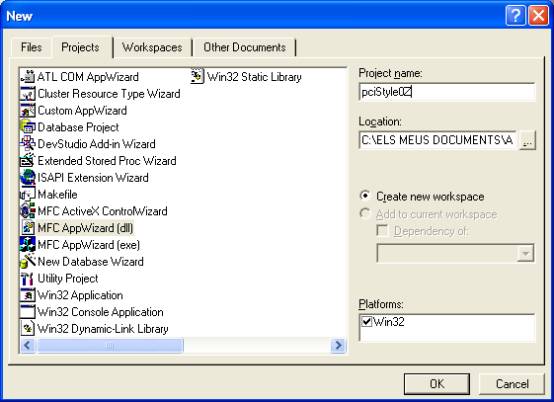
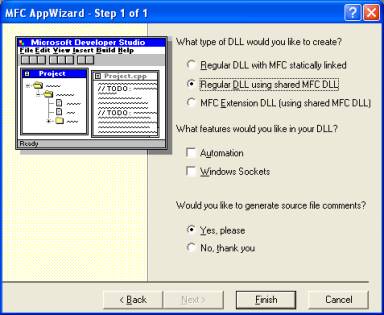
To
choose a regular DLL using shared MFC
DLL :
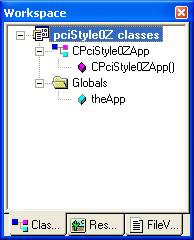
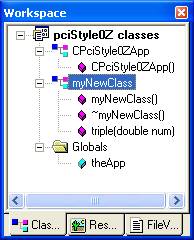
The workspace
looks like this :
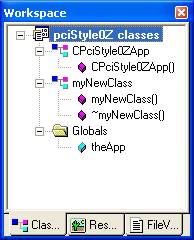
Add a new
generic class (myNewClass) :
Add a new
member function in the new class (double myNewClass::triple(double num))
:
Type a code
in the new function :
double myNewClass::triple(double
num)
{
return 3*num;
}
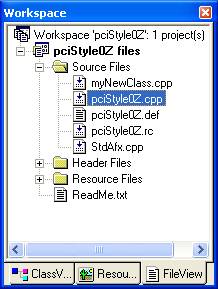
To select
the cpp file (pciStyle0Z.cpp) :
Add the new
class header at the top of pciStyle0Z.cpp (just below #endif):
#include “myNewClass.h”
Add at the
bottom of pciStyle0Z.cpp:
myNewClass nc;
extern "C" double
PASCAL EXPORT byThree(double num)
{
AFX_MANAGE_STATE(AfxGetStaticModuleState());
return nc.triple(num);
}
It is declared a new object nc
from myNewClass class. The function byThree(double
num) returns a double and it
is an extern function usable by any programming environment (like VisualBasic
or VisualC++).
To call a DLL function from
VisualBasic :
Private
Declare Function byThree Lib "pciStyle0Z.dll" (ByVal n As Double) As Double
Private
Sub Command1_Click()
Dim numero As Double
Dim i As
Double
numero =
15
i = byThree(numero)
MsgBox
"Triple of " & numero & " is " & i &
"."
End Sub