Práctica 7: Mouse 1.
1.- El programa Move.
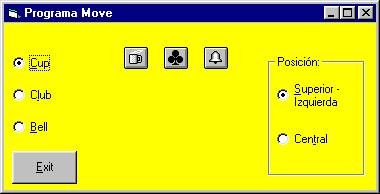
El código:
Option Explicit
Private Sub cmdExit_Click()
End
End Sub
Private Sub Form_MouseDown(Button As Integer, Shift As Integer, X As
Single, Y As Single)
If optSupIzq.Value = True
Then
MoveObj X, Y
Else
MoveObj X - imgCup.Width
/ 2, Y - imgCup.Height / 2
End If
End Sub
Private Sub MoveObj(X As Single, Y As Single)
If optBell.Value = True
Then
imgBell.Move
X, Y
ElseIf
optClub.Value = True Then
imgClub.Move
X, Y
Else
imgCup.Move X, Y
End If
End Sub
2.- El programa Pintar.
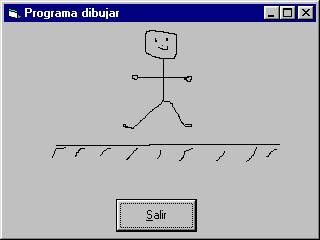
Option Explicit
Private Sub cmdExit_Click()
End
End Sub
Private Sub Form_MouseDown(Button As Integer, Shift As Integer, X As
Single, Y As Single)
'Cambiar
las coordenadas de CurrentX y CurrentY
'por las actuales de X y Y del Mouse.
frmDraw.CurrentX
= X
frmDraw.CurrentY = Y
End Sub
Private Sub Form_MouseMove(Button As Integer, Shift As Integer, X As
Single, Y As Single)
'Si el
botón izquierdo está oprimido actualmente
'dibuja una línea.
If Button
= vbLeftButton Then
frmDraw.Line
(frmDraw.CurrentX, frmDraw.CurrentY)-(X, Y), QBColor(0)
End If
End Sub
3.- El programa MouseMove.
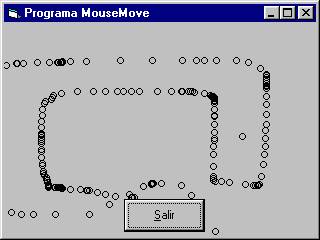
Option Explicit
Private Sub cmdExit_Click()
End
End Sub
Private Sub Form_MouseMove(Button As Integer, Shift As Integer, X As
Single, Y As Single)
'Dibuja un
circulo con un radio de 40 unidades.
frmHowOften.Circle
(X, Y), 40
End Sub