Práctica 8: Mouse 2.
1.- El programa Button.
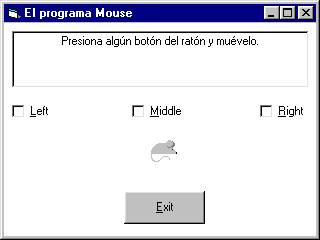
El código:
Option Explicit
Private Sub cmdExit_Click()
End
End Sub
Private Sub Form_MouseDown(Button As Integer, Shift As Integer, X As
Single, Y As Single)
txtDisplay.Text =
""
If (Shift And 1) =
vbShiftMask Then
txtDisplay.Text
= txtDisplay.Text + "Se ha presionado la Tecla Mayúsculas" + vbCrLf
End If
If (Shift And 2) = vbCtrlMask
Then
txtDisplay.Text
= txtDisplay.Text + "Se ha presionado la Tecla Control" + vbCrLf
End If
If (Shift And 4) = vbAltMask
Then
txtDisplay.Text
= txtDisplay.Text + "Se ha presionado la Tecla Alt" + vbCrLf
End If
If (Shift And 7) = 0 Then
txtDisplay.Text
= "No se ha presionado Alt, Shift o Ctrl"
End If
End Sub
Private Sub Form_MouseMove(Button As Integer, Shift As Integer, X As
Single, Y As Single)
If (Button And 1) =
vbLeftButton Then
chkLeft.Value = 1
Else
chkLeft.Value = 0
End If
If (Button And 2) =
vbRightButton Then
chkRight.Value = 1
Else
chkRight.Value = 0
End If
If (Button And 4) =
vbMiddleButton Then
chkMiddle.Value = 1
Else
chkMiddle.Value = 0
End If
End Sub
Private Sub Form_MouseUp(Button As Integer, Shift As Integer, X As
Single, Y As Single)
If Button = vbLeftButton Then
chkLeft.Value = 0
End If
If Button = vbRightButton
Then
chkRight.Value = 0
End If
If Button = vbMiddleButton
Then
chkMiddle.Value = 0
End If
txtDisplay.Text
= "Presione un botón del ratón y muévelo"
End Sub